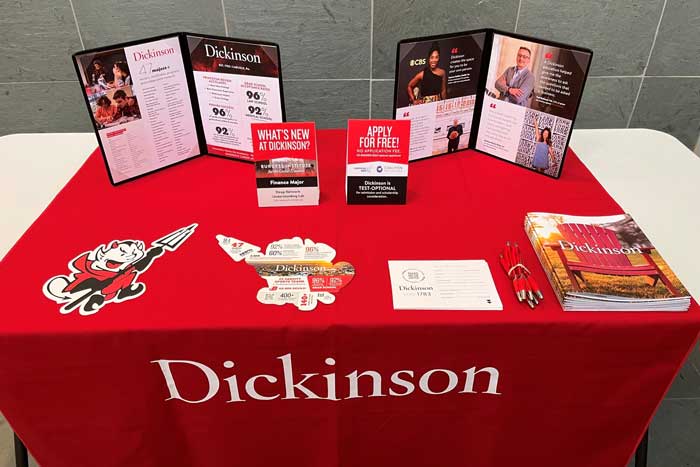
College Fair Table Display
Thank you for representing Dickinson at a college fair. The materials included with the fair supply box will help you to convey Dickinson’s distinctive personality to prospective students. A few notes on the use of these materials:
Inquiry Cards
- The inquiry card requests the information necessary to create a record for a student. Please encourage students to complete the entire card.
- Mention the QR code option. If students would prefer, they can scan the QR code on the inquiry card and fill it out online instead.
- Student information must be kept confidential. Please keep completed cards out of sight by turning them over or putting them in your fair box. After the fair, please return cards through the mail using the postage-paid return label. Do not copy or scan the cards to email (unencrypted email is not secure).
StriveScan Fairs
- Download the app ahead of time.
- You can access the fair 1-2 hours before the fair starts.
- Scan the student QR code during the fair.
- The day after the fair, you can delete the app from your phone.
Dickinson Brochures
Below is a photo of a sample college fair table display. Please encourage as many students as possible to take one of each item -- the brochure, the Red Devil cutouts and some stickers.
Folios
There are two folios to be displayed: One showcases alumni spotlights, while the other displays Dickinson majors and important data points. Please include both standing on the table as shown to help draw students eyes to the table. Make sure you're familiar with the information on the sheets and can point to it when questions are asked.
What to return?
Please return all materials within three days. Prompt return ensures we can get information to interested students in a timely fashion and allows us to use the remaining materials and banner for other events.